Common faults we see
- Random shutdowns and reboot loops
- No display after GPU or RAM changes
- AIO pump noise or CPU overheating
- PSU underrated for GPU upgrades
- Dust-choked radiators and hot spots

Specialised workstation fleets
Custom PC diagnostics—PSU headroom, thermals, GPU power, AIO coolers, and assembly issues—with stress testing after targeted repair.

What you get
We confirm the fault, your requirement, and the repair path so you can approve the plan with confidence.
Custom and business gaming PCs introduce variables—PSU quality, GPU power cables, AIO coolers, and cable routing across fleets. National Laptop Computer Repair Centre approaches them methodically: reproduce instability, measure power delivery, and inspect assembly before recommending parts.
Whether your fleet supports creative studios, training rooms, or competitive esports programmes, we document findings so organisations can decide on upgrades versus targeted repair with clear asset notes.
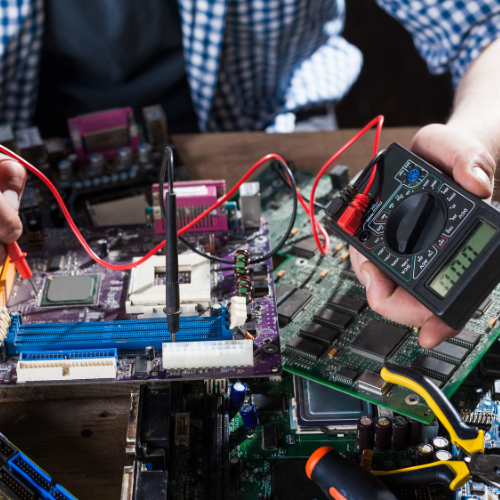
Random shutdowns and reboot loops often trace to PSU inadequacy, overheating, or marginal RAM overclocks. We validate with known-good test gear and controlled load.
No display output after GPU or RAM changes frequently implicates seating, power connectors, or BIOS settings—we confirm hardware before advising RMA paths.
AIO pump noise, dried paste on hot CPUs, and dust-choked radiators are routine maintenance items that restore stability without replacing the whole platform.
PCIe lane issues, faulty risers in vertical GPU mounts, and intermittent USB controller faults on premium motherboards need time on the bench. We may recommend board-level referral if socket damage or liquid corrosion is present.
Custom loop leaks and prior “quick fix” soldering are assessed honestly—sometimes cleaning and component replacement is viable; sometimes chassis and board replacement is safer economics.
When you are ready to refresh GPU or platform generation, we can transfer storage, validate Windows licensing implications, and stress-test after assembly. We do not sell hype—only parts that fit your case airflow and PSU headroom.
Why trust NLCRC
Published service levels
MSP response targets by tier live on /trust/service-levels — not buried in a PDF after you ask.
Scope before spend
Work is agreed in plain English before it starts, whether that is a retainer change or a workshop job.
Questions
Booking through verified links helps us plan bench time and parts. If you are unsure which path fits, contact us with the model and symptoms and we will route you to laptop, desktop, or specialist intake.
No. Diagnostics establish the fault and options first. Parts, labour, and any data-risk steps are confirmed before we proceed unless you have authorised an agreed expedited exception in writing.
Often yes, but recovery depends on media condition. We triage storage separately and explain viability before attempting invasive work. See our data recovery page for RAID and NAS scope.
No. We focus on Windows PCs, laptops, custom desktops, and Apple Mac computers, plus related board-level and storage work.
Yes. We treat them like any custom build—verify power, thermals, and warranty stickers before invasive work, and note manufacturer restrictions where they exist.
Book online where a verified link is available, or contact National Laptop Computer Repair Centre for repair scope and next steps.
With your permission we use cookies to measure visits and how well our ads work, and to remember your preferences. If you reject, we only count anonymous page visits with no cookies. Privacy policy